Public EV charging with the Shell App
We are changing the way drivers find, access and pay for EV charging.
From October 2025, we are supercharging your experience by bringing EV charging into the Shell App. Bringing EV charging, fuel, and loyalty into one app offers customers a more comprehensive, secure and user-friendly experience.
Get ready! Navigate to the section that best applies to you:
I am a driver using Shell Card for business
What’s changing?
One app for all your mobility needs - It’s now easier to charge your EV while you're on the road. The Shell App will be your app for EV public charging, replacing the Shell Recharge App. It’s the same app you may already know for fuel and our loyalty program, eliminating the need to switch between multiple apps.
With the Shell App, you will be able to:
- Access a wide network of EV charge points across Europe
- Locate nearby charge points on our interactive map
- Check charge point availability in real time to avoid any wait times
- Start and stop charging sessions from the app at applicable charge points
- View your charging history and track your usage
- Earn loyalty points through Shell GO+ Rewards
Important:
Some EV features you may currently use in the Shell Recharge app, such as route planning, Apple CarPlay, and Android Auto, will not be immediately available in the Shell App. We’re introducing updates gradually to ensure a smooth and reliable experience. You can still locate your charge point and navigate to it using your map provider.
What do you need to do?
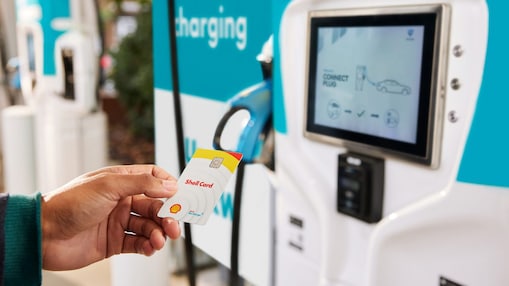
- Your physical Shell Card for business EV charging will continue to function as usual.
1. If you don't have the Shell App yet, download it here.

2. Log in using your Shell Recharge credentials. No need to create a new account.
Please note: all users accessing EV charging through the Shell App will automatically be enrolled in our loyalty programme, with access to rewards.
3. If not prompted automatically, from the homepage, go to “More” > “Vehicle preferences”, and select the type of vehicle you drive regularly.
4. If you haven’t registered your Shell Card in the Shell App yet, and if not prompted automatically, from the homepage, go to “More” > “Payment methods” and add your Shell Card.
This will allow you to conveniently start and stop EV charging sessions directly through the Shell App at applicable charge points.
Note: Your fleet manager must approve your request to add the Shell Card. Please allow time for this process.
5. From here on, use the Shell App for EV public charging!
Do you also use a Shell Recharge Card for private EV charging?
You can link both Shell Card for business use and your private Shell Recharge Card to your Shell App account.
Please note: the way you can use your private Shell Recharge Card has changed.
Privacy Statement of Shell Card
Greater control over linking Shell Card
Gain enhanced control and security: only authorised drivers can now link a Shell Card to their profile and use the Shell App to start, stop, and pay for EV charging sessions.
To support your drivers with a smooth transition from the Shell Recharge App to the Shell App, be ready to accept requests of your drivers linking their Shell Card to their Shell App. Only Shell Fleet Hub users with “Fleet Manager” role can approve requests.
What do I need to do?
How do I accept drivers' requests?
You can approve requests via “Mobile Payments” in Shell Fleet Hub. However, please make sure that Mobile Payment is active on your profile.
You don’t have Mobile Payment active on your Shell Fleet Hub profile yet?
If you don’t see Mobile Payments in the “Cards” section of Shell Fleet Hub, please contact your Account Manager or Customer Service.
Important:
- Once a driver adds their Shell Card to the Shell App, mobile payment for fuel will be automatically enabled. You can manage card restrictions and limits through Shell Fleet Hub.
- All users accessing EV charging through the Shell App will automatically be enrolled in our loyalty programme, with access to rewards.
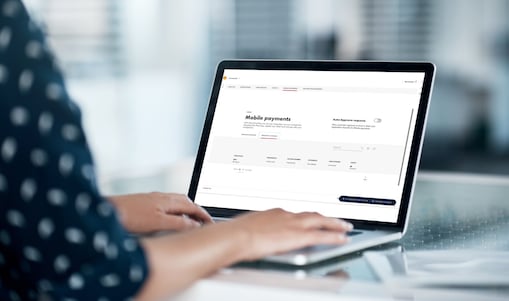
To maintain greater control over the registration process, you, as the fleet manager, can initiate each card registration directly through Shell Fleet Hub.
Services for customers using Shell Recharge cards have recently changed. Here’s what you need to know:
- Pay-as-you-go: charging sessions are now paid immediately after use.
- Simplified invoice: a simple receipt after each session (no invoice with your VAT number available)
- Limited number of charge cards: up to 3 physical charge cards and 1 digital card.
Get in touch
For public EV charging tailored to business needs, switch to Shell Cards with Shell Fleet Solutions.
As a user of Shell Fleet App, continue to conveniently use Shell Fleet App to locate EV charge points. You can use the Shell App to enjoy Shell loyalty benefits. Learn more about Shell GO+ Rewards here.
Drivers who are currently using the Shell Recharge App can download the Shell App on the App Store or Google Play to locate nearby EV charge points and check real-time availability to avoid wait times. Please note that it is not possible to register Shell Cards to the Shell App.
Frequently Asked Questions
Driver
Driver
I have a Shell Card for business and a Shell Recharge card for personal use. Can I link both to my account in the Shell App?
Yes, you can link both your Shell Card for business and your Shell Recharge card for personal use to the Shell App using the same account. If you want to use two separate accounts for business and for private use, you will need to log out and log in from the Shell App to switch account.
Will I retain all the same features of the Shell Recharge App in the Shell App?
In the Shell App, you can locate charge points, view their details and status, and start and stop charging sessions. Please note that, for now, features such as route planning, Apple CarPlay, and Android Auto are not available in the Shell App. However, you can still navigate to your selected charge point using your preferred map provider.
Can I continue to use my Shell Recharge charge card for personal use?
If you are using your Shell Recharge card for personal use, it will continue to work. Please make sure to complete all required steps, including downloading the Shell App when instructed and setting up an accepted payment method. If you have more than three charge cards, only the most recent ones will remain active. If you are using a personal Shell Recharge card for business purposes, you risk your card to be blocked. Please reach out to us for an offer tailored to business needs here.
Can I continue to use my Shell Card for business at the charger?
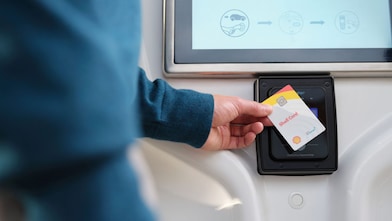
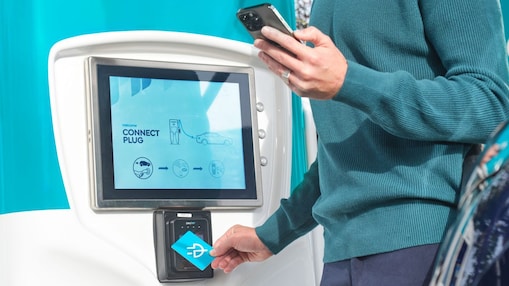
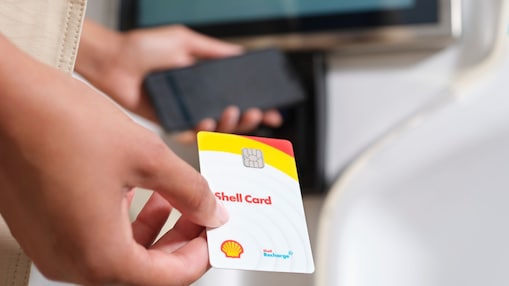
Yes, your physical Shell Card for business use will continue to work as usual. Tap it on the charge point to start and stop charging sessions.
I am a Shell GO+ Rewards member and a Shell Recharge App customer. Will I have two accounts that need to be closed?
No, the accounts in the two apps will merge in the Shell App and you will be able to charge, collect/redeem loyalty points and fuel up if needed – all from one app.
Do I need to set up a new account in the Shell App?
No, simply download the Shell App and use your log in details from the Shell Recharge app. There is no need to create a new account.
Will I be able to charge abroad?
Yes, charging abroad with your Shell Card is possible. To find available charging points, please refer to the map in the Shell App. Tap on a specific charge point to view details, including whether mobile payment is supported.
Can I use the Shell App for EV charging at home?
No, the Shell App is dedicated to EV public charging, fuel and loyalty. For EV charging at home, you can use the 50five e-mobility app if your charge point has been migrated from Shell Recharge Solutions to 50five. Find out more information here.
Fleet Manager
Fleet Manager
I have a business and have been using the Shell Recharge App for my business EV charging. Will I continue to receive a full VAT invoice?
With a Shell Recharge card for personal use, you will receive a simplified VAT invoice for each charging session directly in the Shell App, immediately after charging.
If you are a business customer and require a full VAT invoice, please ensure you sign up for a Shell Card through Shell Fleet Solutions. This offering is specifically tailored to meet the needs of business drivers. Learn more about Shell Card here.
All
All
Why is the Shell Recharge App moving to the Shell App?
We’re integrating EV charging on-the-go functionality into the Shell App to provide a more connected and convenient experience, bringing together EV charging, fuel, and loyalty in one place.